
Help & FAQs
Release V.0.0.0
Step 1
Please go to https://www.peoplecert.org
You will see the following at the top right hand corner (encircled)

Please click on “Create an Account”
Step 2
Please create an account by completing the details.

Step 3
Your candidate Id is unique to you and will be the single reference point for certifications you may complete with Peoplecert.
Please create your account and remember the login and password.
Step 1
Create your student account.
If student account is already created, then login to your account.
Step 2
Enter your voucher code in the box indicated

Step 3
Select date and time for exam.
The Exam date can be re-scheduled up to 3 days before the exam date free of cost.
If re-scheduling the exam with less than 3 days before exam date, fees of $ 105 are payable.
The exam voucher is valid for one attempt only. To take a second attempt, one can pre-book “Take2” option, while booking for the 1st attempt, The charges for Take2 are $ 60. Take2 has to be taken while purchasing the exam in the 1st instance.
Else full fee payment will need to be done for any future take.
How can I do a basic check for Examshield for computer’s setup?
https:// download.peoplecert .org/Exam Shield/install.aspx?id=anonymous can be used to perform a basic check of the computer’s setup. This link is not useful in checking the restrictions though since some of them can appear the moment the candidate tries to connect to the proctor or when he is validated and allowed entry to our servers
Step 1: Enter your peoplecert Account:

Step 2 Click on the tab Certifications and Memberships
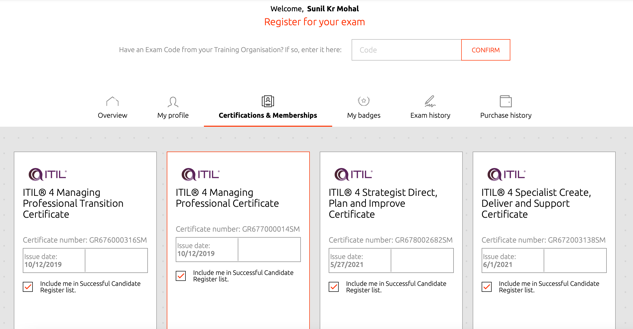
Step 3 Go to any certification available, as seen above and then click on review. You will be able to download the certificate on clicking Review

There could be a technical difficulty. Please write to us @ info@ducisgroup.com and provide the following details:
- Name
- Email ID
- Exam ID
We will make concerted efforts to resolve the issue within 48 hours.
Engage with us to unlock potential for lowering costs, growing revenue and enhancing operational performance.